
Cable boxes are gathering dust. Streaming is taking over. And somewhere in between, a technology called IPTV has been quietly replacing traditional TV for millions of viewers. If you have ever wondered how IPTV work, you are in the right place. This guide breaks it all down in plain language: what IPTV actually is, how the technology delivers live channels and on-demand content to your screen, what equipment you need, and how to choose a provider worth your time.
What Is IPTV?
IPTV stands for Internet Protocol Television. In plain terms, it is a way to watch television over your internet connection instead of through a cable line, a satellite dish, or an antenna. No specialized infrastructure is needed beyond the broadband connection most households already have.
A full IPTV subscription typically bundles several content types into one package. You get live channels (news, sports, entertainment airing in real time), a video-on-demand (VOD) library you can browse at any hour, an electronic programme guide (EPG) that works just like a cable TV guide, and catch-up or replay TV so you can go back and watch something you missed earlier in the day or week.
Services like IPTV give you access to thousands of live channels and on-demand content through a single subscription, delivered entirely over the internet with no dish or coax cable required.
How Does IPTV Work? Step by Step
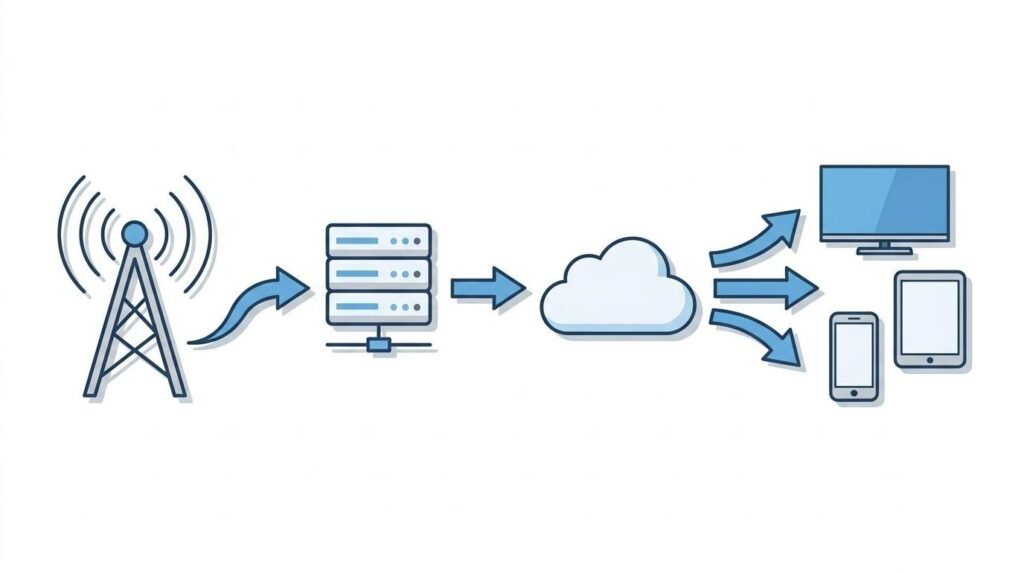
Think of IPTV like YouTube, but for live TV channels. Content is packaged as data, sent across the internet, and reassembled on your device in real time. Here is the process in four steps.
Step 1: Content is encoded. Raw broadcast video is compressed using codecs like H.264 or H.265. These formats reduce file sizes dramatically while keeping picture quality high. Without compression, a single live channel would consume far more bandwidth than any home connection could handle.
Step 2: The signal reaches a server. The encoded video is sent to the IPTV provider’s server infrastructure. These servers store VOD content and relay live streams around the clock. Reliable providers run multiple servers with redundancy so that if one goes down, another picks up without interruption.
Step 3: Data travels as IP packets over the internet. The compressed video is broken into small data packets and transmitted across the internet to your device. This is the same mechanism used to deliver any other web content, from emails to video calls. The key difference from traditional broadcast is that the signal is sent directly to your device on demand rather than broadcast to everyone simultaneously.
Step 4: Your device decodes and plays the content. Your smart TV, phone, tablet, or streaming box receives the packets, reassembles them in order, and decodes them back into the video and audio you see on screen. This all happens in fractions of a second, which is why the experience feels live and continuous.
What Do You Need to Use IPTV?
Getting started with IPTV does not require much. Most households already own at least one compatible device. Setup typically takes under 10 minutes from the moment you subscribe.
A compatible device. IPTV works on a wide range of hardware: Samsung, LG, Sony, Philips, and Hisense smart TVs, Android TV boxes, Amazon Fire Stick, Apple TV, iOS and Android smartphones and tablets, and Windows PCs. If your TV is not internet-capable, a Fire Stick or Android box bridges the gap at low cost.
A stable internet connection. Consistent speed matters more than peak speed. Here are the recommended minimums by stream quality:
| Stream Quality | Recommended Minimum Speed |
| SD | 3–5 Mbps |
| HD | 10–20 Mbps |
| 4K | 25–40 Mbps |
For live sports and 4K content, a wired Ethernet connection is strongly recommended over Wi-Fi. Wireless connections introduce latency and interference that can cause buffering at exactly the wrong moment.
An IPTV app. The two most widely used apps are IPTV Smarters Pro and TiviMate. Both are available on Android, Fire Stick, and Apple TV. You enter your subscription credentials once and your full channel list loads automatically.
An IPTV subscription. After subscribing to a provider, you receive login credentials (typically a username, password, and server URL) by email. You enter these into your app and you are ready to watch. A minimum connection of 2 Mbps is required, though higher speeds unlock better quality streams.
IPTV vs. Traditional TV vs. Streaming Services
IPTV sits between old-school cable and modern on-demand streaming. It shares features with both, but neither cable nor Netflix fully replaces what a good IPTV subscription provides.
| Cable/Satellite | Streaming (Netflix/Disney+) | IPTV | |
| Live channels | Yes | No | Yes |
| On-demand content | Limited | Yes | Yes |
| Live sports | Add-on cost | Limited | Yes (often included) |
| Catch-up/Replay TV | Limited | No | Yes |
| EPG | Yes | No | Yes |
| Long-term contract | Usually | Monthly | Often none |
| Device flexibility | Low | High | High |
| 4K content | Sometimes | On some plans | Yes |
The key difference between IPTV and Netflix is live TV. Netflix is an on-demand library. IPTV is a full television replacement: live channels, live sports, real-time news, catch-up, and on-demand, all in one place. It is closer to cutting your cable subscription than it is to signing up for another streaming add-on.
Is IPTV Legal?
IPTV as a technology is completely legal. Telecom companies and major broadcasters around the world offer their own IPTV services. The legality depends entirely on whether the provider holds proper broadcast licenses for the content they distribute.
The Netherlands has one of the highest rates of unlicensed IPTV consumption in Europe. According to an AAPA economic report cited by internetvergelijk.nl, the Netherlands accounts for 8.2% of all illegal IPTV consumption across the EU. That figure reflects strong demand for flexible TV options, but it also signals real risk. Stichting BREIN, the Dutch anti-piracy organization, actively pursues unlicensed providers and has shut down multiple services in recent years.
With a licensed provider, there is nothing to worry about. The warning signs of an unlicensed service include suspiciously low pricing with no transparent business information and no verifiable company history. Legitimate services are transparent about who they are and have an established track record.
The Best IPTV Provider for Dutch Viewers
One of the longest-standing Nederlandse IPTV providers is IPTVmate, founded in 2011. The service offers 30,500+ live channels and a VOD library of 150,000+ titles, with Dutch subtitles on most titles. Every subscription plan includes 4K and Full HD quality, an EPG, catch-up and replay TV, and pay-per-view sports without any additional charge. Sports coverage includes ESPN, Ziggo Sport, beIN Sports, DAZN, Eredivisie, Champions League, F1, MotoGP, and UFC.
IPTVmate works across all major devices: Samsung, LG, Sony, Philips, and Hisense smart TVs, Android TV, Amazon Fire Stick, Apple TV, iOS, Android, and Windows PC. After subscribing, login credentials arrive by email within 5 to 15 minutes. There are no contracts and no automatic renewals, so you stay in control of your subscription. Customer support is available via WhatsApp and email, with responses typically within around 3 hours.
Dutch viewers consistently rate it among the Beste IPTV Nederland options for channel stability and support. The homepage carries the claim “Beste IPTV Nederland 2026,” which reflects a service that has been refining its platform for well over a decade.
Frequently Asked Questions
Do I need a special IPTV box or device?
No. IPTV works on most smart TVs, smartphones, tablets, Amazon Fire Sticks, Apple TV boxes, and Windows computers. The only case where a dedicated box is useful is if you own a non-smart TV. In that case, an Android TV box or Fire Stick connects it to the internet and runs the IPTV app.
What internet speed do I need for IPTV?
For SD streams you need 3 to 5 Mbps. HD requires 10 to 20 Mbps. 4K streams need 25 to 40 Mbps. Stable connection consistency matters more than raw peak speed. A connection that holds steady at 15 Mbps will outperform one that spikes to 100 Mbps but drops frequently.
Is IPTV legal?
IPTV is a legal technology. Whether your subscription is legal depends on your provider. Licensed services that hold proper broadcasting rights operate fully within the law. Unlicensed services that carry copyrighted content without authorization do not. Transparency and a verifiable track record are the best signals that a provider is legitimate.
What is the difference between IPTV and streaming services like Netflix?
Netflix is on-demand only. You browse a catalog of movies and series and watch them whenever you like. IPTV includes everything Netflix does not: live channels, live sports, real-time news, and an EPG that mirrors a traditional TV guide. IPTV is a cable TV replacement. Netflix is a single-service supplement.
Why does IPTV buffer or freeze?
Buffering is almost always caused by one of three things: a connection that is too slow for the stream quality selected, Wi-Fi interference between your router and device, or an overloaded server on the provider’s end. Check your actual speed against the requirements above, switch to a wired Ethernet connection if possible, and contact your provider if the problem persists across multiple channels.
Can I watch live sports on IPTV?
Yes, and live sports is one of IPTV’s strongest advantages over on-demand streaming services. Quality subscriptions include channels such as ESPN, Ziggo Sport, beIN Sports, and DAZN, with live coverage of the Eredivisie, Champions League, Formula 1, MotoGP, and UFC. Pay-per-view events are often included in the subscription at no extra cost.
How do I get started with IPTV?
Choose a licensed provider with a verifiable history. Subscribe and wait for your login credentials, which arrive by email, usually within 15 minutes. Download IPTV Smarters Pro or TiviMate on your device. Open the app, enter your credentials, and your channel list loads automatically. The entire process takes under 10 minutes from start to first channel.
